How a bill splitter app keeps every shared cost fair
What a bill splitter app does, how to split bills with friends step by step in Half Tab, and how to use it in your own language. Free on iPhone and iPad.
Only one bill? Use the free calculator
Split a restaurant bill with tip, or split shared costs by income, right in your browser. No sign up needed.
Splitting one dinner is easy. Splitting a four day trip is not: one person pays the hotel, another fills the tank, someone covers dinner on the second night, and a friend joins halfway through. By the last day, nobody remembers who owes what, and the group chat fills up with screenshots of receipts.
A bill splitter app fixes that by keeping the running total for the whole group, so everyone pays once at the end and the numbers always add up.
What is a bill splitter app?
A bill splitter app is a shared expense tracker for a group. Every time someone pays for something, you add it: who paid, how much, and who it was for. The app keeps each person’s balance up to date and, when you are ready, works out who should pay whom to settle everything.
Good bill splitting apps do three things well:
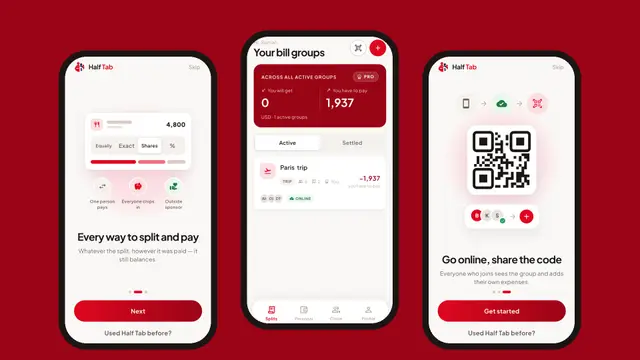
- They split the way your group really splits. Equally, by exact amounts, by shares or by percentage.
- They settle up in as few payments as possible. Not everyone paying everyone.
- They stay out of the way. Adding an expense should take a few seconds, even with no signal.
Calculator, spreadsheet or app?
| Option | Good for | Where it falls short |
|---|---|---|
| A calculator | One bill, split on the spot | Forgets everything once you close it |
| A spreadsheet | People who enjoy formulas | Hard to edit on a phone, easy to break |
| A bill splitter app | Trips, flats, couples and regular dinners | You need to install it |
For a single restaurant bill, the free split bill calculator on this site is all you need. As soon as there is more than one bill, an app saves you the maths and the arguments.
How to split bills with friends in Half Tab
- Make a group. Name it after the trip, the flat or the dinner club, and choose its currency.
- Add people. Pick them from your contacts or just type their names. Friends do not need the app unless you want them to add expenses themselves.
- Add expenses as they happen. Enter the amount, who paid and who it was for. Leave out anyone who was not part of that expense.
- Check the balances. Half Tab shows what each person has paid and what they owe, updated after every expense.
- Settle up. Half Tab lists the payments that square everyone up. Mark each one as paid, then close the group and share the PDF summary.
Four ways to split a bill
Not every expense should be split equally, so Half Tab supports four split modes:
- Equally: the same share for everyone in the expense.
- Exact amounts: each person pays what they ordered.
- Shares: a couple counts as two shares, a bigger room as one and a half.
- Percentage: useful for splitting rent or bills by income.
The shares always add back up to the bill, to the last cent, so nobody is out of pocket because of rounding.
Settling up with the fewest payments
Here is a weekend trip for four friends. The total was 1,000, so each person’s share is 250.
| Person | Paid | Share | Balance |
|---|---|---|---|
| Maya | 600 (hotel) | 250 | gets back 350 |
| Leo | 120 (fuel) | 250 | owes 130 |
| Sam | 280 (dinner) | 250 | gets back 30 |
| Ana | 0 | 250 | owes 250 |
Half Tab matches the biggest debts with the biggest credits:
- Ana pays Maya 250.
- Leo pays Maya 100.
- Leo pays Sam 30.
Three payments and everyone is even. A group of four never needs more than three.
Use Half Tab in your own language
Half Tab speaks 21 languages, including Bahasa Indonesia, Hindi, Japanese, Chinese, Spanish, Portuguese, French, German and Arabic. The first time you open it, the app picks the language from your phone’s region. To change it, open the app’s settings and choose another language at any time. Amounts and dates follow the language you pick.
That matters in mixed groups: on a trip with friends from different countries, each person can use Half Tab in the language they read best, while the group shares the same numbers.
More than group bills
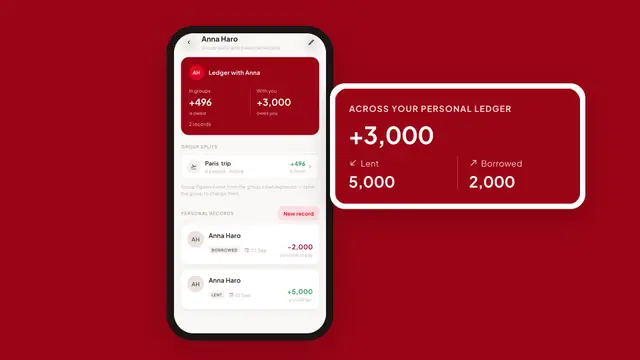
Half Tab also keeps a personal ledger for money you lend and borrow one to one, next to what that person owes you in your groups. Read how to keep track of money you lend to see how it works.
Still comparing apps? See the best bill splitting apps compared, with their free plan limits and offline support.
Frequently asked questions
What is a bill splitter app?
A bill splitter app records shared expenses in a group, such as a trip or a shared flat, and works out how much each person owes. Instead of settling every bill on the spot, the group settles once, with the fewest payments.
Is Half Tab free?
Yes. Groups, every split mode, settling up and the PDF summary are free. Half Tab Pro is an optional subscription that keeps groups on our server so they follow you to a new phone and friends can join by QR code.
Can I use Half Tab without internet?
Yes. Groups live on your phone, so you can add expenses on a plane or in the mountains. You only need a connection to share a group online.
Can I change the language of the app?
Yes. Half Tab picks its language from your phone's region, and you can switch to any of its 21 languages in the app's settings at any time.